Nokogiri and webscraping.
Nokogiri is a really powerful tool that allows us to scrape data from websites by targeting HTML elements and removing the content within.
Why?
Nokogiri is extremely useful if you want to deal with data from a website that doesn't have an up to date API, an API that doesn't serve the information you need, or no API at all.
Is it actually legal?
Yeah? I mean, sort of? Mostly yeah.
Web scraping can be a bit of a grey area legally speaking, as you are actively copying someone's content, it is against the terms of service on some websites - but enforcing these is pretty hard.
Australia outlaws web scraping for the purpose of harvesting email addresses in order to distribute advertising. Unless you are being really malicious, you are probably fine.
Gotchas
Nokogiri only returns the document it lands on (straight HTML in this case). This means if the site you are scraping has data served by an AJAX request, it will not work right out of the box.
Redirections give you the same issues. Fortunately both can be tackled by using watir to simulate a browser and wait for data to be served.
Nokogiri is slow. Much slower than a standard API (because it grabs a whole document from the server).
It's very fickle. It relies on consistent styling, any changes to the structure of elements on a page it is scraping, can totally break your code (this often has more to do with Ruby hitting a `nil` value).
You have limited control over the content you get back, especially if you are a bad person, and hotlinking back to their images. If they choose to change all those URLs to something naughty, you can't prevent it. This has caught news corporations out in the past.
Some websites try to prevent web scraping by limiting the number of requests you can make over a certain period, sometimes trickery with timers is necessary.
Getting started:
We'll start by making a very basic scraper that just returns a text version of a website.
gem install nokogiri from the terminal.
We'll start by making a plain ruby file, inside it we need to add:
require 'nokogiri'
require 'open-uri'
require 'pry'
Next we need to find a website to look through, in this instance we're going to use bad taxidermy.
base_url = 'http://www.badtaxidermy.com/'

index = Nokogiri::HTML( open( base_url ) )

binding.pry
With these lines, I've saved the root of the URL I'm working with in a variable, which is convenient for concatenating links, depending on how much work Noko is doing.
Next I used Nokogiri to process the HTML that open-uri extracts from the URL. If we call the index variable from the terminal, all the HTML on the base_url page is available to us.
At this point it's a good idea to reference the actual website, inspect elements and to see what data we might actually want to scrape.
Nokogiri works by targeting HTML elements and CSS identifiers. In this instance, I'm going to say I want page's title text. Inspecting the title tells me that it has a class of "title". So far so good, right?
From the terminal, I can tell Noko to select all items within the index that have a CSS class of "title" using index.css(".title").
Unfortunately this returns a huge block of response text.
I can be a little more specific and call index.css(".title")[0] and select the first element returned to me, but that still leaves me with:
index.css( ".title" )[0]
=> #(Element:0x3fcb95879b64 {
name = "div",
attributes = [ #(Attr:0x3fcb958799fc { name = "class", value = "title" })],
children = [ #(Text "\n\t\t\t\tBad Taxidermy\t\t\t")]
})
Still not ideal. It's the right element and the right content, but still messy and prone to breaking.
The biggest downfall of scraping data by elements like this is how general the responses can be.
If we call index.css(".title").length, we can see there are actually 11 elements with that same class. Specificity is key.
Inspecting again, I can see the main title is nested in another div with the class of header.
index.css(".header .title").text => \n\t\t\t\tBad Taxidermy\t\t\t
So now we've got our text, but it has a bunch of invisible characters in it. A newline and a few tabs. Our last step is to chain .strip to our request, index.css(".header .title").text.strip => "Bad Taxidermy".
As you can see, the scraping isn't hard - but it is very delicate and requires a bit of processing. Websites which have consistent classing and structure will make your life MUCH easier, the rest take a lot of trial and error.
From here we'll try something a little more useful: Stripping the titles and image URLs from every post on the index page.
Firstly, we get all our posts:
posts = index.css(".post")
Next, we iterate through each post, and search through each post for our information:
posts.each do |p|
  puts ""
  puts p.css( ".title" ).text
  puts p.css( ".post_body .postimage img" ).attr( "src" ).value
end
Using binding.pry and a little bit of digging, I was able to specify the exact elements I wanted in each post, and then outputting the values returned.
Those are the basics for extracting data - I've got a complete demo that goes a bit further, scraping the site through all paginated pages, but otherwise -- it is well worth looking through the docs.
Something more practical
Pulling this information dynamically is great, but it certainly comes with risks.
For instance, the URLs, structure or content of a website can change, and render your lovingly crafted code useless. It also means you are constantly hitting someone's site for content and using their bandwidth.
Instead, it makes more sense to save the data we want and reference it ourselves.
Noko on rails:
In this next section, I'm going to create models to store my data, create a rake task that automates my web scraping, and then display it all nicely in my app.
Getting started:
Create a new app:
rails new pokedex_app
Then establish a model, a controller and a view:
rails g model Pokemon name:string icon:string image:string
rails g controller pokemon index
With this app, my intention is to scrape a few images, along with the text, then to save them in individual models.
This gives me a lot more control over the final page content (though not the images. If I were doing this for real, I would upload them directly to cloudinary or another content management service).
Next, in our gemfile we need to add Nokogiri (but not open-uri -- it's included by default. We only call it when we require it).
gem 'nokogiri'
Next, we are going to set our root page to our Pokemon index page
root 'Pokemon#index'
And then our controller needs to know what @pokemon actually are:
def index
  @pokemon = Pokemon.all
end
Then, we want to make our content display in index.html.erb:
<div class="container">
  <% @pokemon.each do |p| %>
    <div class="card">
    <div class="title">
    <h3><%= p.name %> <img src=<%= p.icon %> alt="<%= p.name %>'s icon" class="icon" ></h3>
    </div>
    <div class="imgContainer">
    <img src=<%= p.image %> alt="<%= p.name %>'s image">
    </div>
    </div>
  <% end %>
</div>
And add style (pokemon.scss):
* {
  box-sizing: border-box;
}

body {
  background-color: rgba(0,0,0,0.4);
  font-size: 0;
}

.container {
  text-align: center;
}

.card {
  border: 1px solid rgba(255,255,255,0.4);
  display: inline-block;
  border-radius: 20px;
  padding: 10px;
  background-color: rgba(200,200,200,1);
  margin: 5px;
}

.title {
  text-align: center;
  border: 1px solid rgba(0,0,0,0.1);
  background-color: rgba(255,255,255,0.3);
  border-radius: 20px;
}

.title h3 {
  font-size: 18px;
  margin: 5px auto;
  font-family: arial;
}

.title img {
  vertical-align: middle;
}

.icon {
  width: 32px;
}
Finally:
bundle install
rake db:migrate
And we're ready.
Custom rake tasks:
For data we only need to extract once, it is worth writing a custom rake task.
This can be generated through rails with rails g task task_name task_method.
For this example, we will be using rails g task pokemon create - this will add a rake task called 'pokemon', and a method called create.
This is called the same way we might call db rake tasks: rake pokemon:create.
In here we will define our web scraping task, which will run every time we call our create method.
It is important to require open-uri, otherwise the rake will not be able to open files or links.
namespace :pokemon do
  desc "Scrapes pokemon from the internet."
  task create: :environment do
    Pokemon.destroy_all

    # It is unnecessary to require the 'nokogiri' gem as it is in the gemfile already, however, 'open-uri' isn't (though it is inclusive with rails). We need to require it for this individual task.
    require 'open-uri'

    # Old URL:
    # base_url = "http://pokemon.wikia.com/"
    # index_page = "wiki/List_of_Pokemon"

    # new URLs
    base_url = "http://pokemon.wikia.com/"
    index_page = "List_of_Pokémon#Generation I"

    # Unfortunately this website changed their URL slightly in order to accent the 'e' in Pokemon, which kills open-uri. It permits only ascii characters. As a result, a new gem is needed to translate the url into something open-uri can digest.

    # This step is *only* necessary in the instance of foreign characters in a url.

    # Get webrick's http utilities package to encode the url
    require 'webrick/httputils'

    # The URL I need to modify
    query = base_url + index_page

    # Encode it into binary using the webrick gem
    query.force_encoding('binary')
    query = WEBrick::HTTPUtils.escape(query)

    # Carry on as normal
    pokedex = Nokogiri::HTML( open(query) )
    # Pokedex is the response text of the index page

    # Next I find all the table elements
    tables = pokedex.css( ".wikitable" )

    # I target only the first table because I only want the first generation of Pokemon (the others are heathen scum, and don't exist as far as I'm concerned)
    generation_1 = tables[ 0 ]

    # Once I've selected my specific table, I get a list of table rows to iterate through.
    gen_list = generation_1.css( "tr" )

    #Each with index gives me access to the index variable, a counter for each run of the loop,
    # I use this to hard code the IDs of my models (instead of auto-increment).
    gen_list.each_with_index do |p, index|

      # Firstly I loop through each link in the table
      unless p.css( "a" )[ 1 ].nil? # If this element has data
        poke_url = p.css( "a" )[ 1 ].attributes[ "href" ].value # Extract the url (ie: /wiki/bulbasaur)

        # I use the url returned by the table and then access /that/ page and scrape the data page by page
        single_pokemon = Nokogiri::HTML( open( base_url + poke_url ))

        name = single_pokemon.css( "h1" ).text
        image_list = single_pokemon.css( ".floatnone .image-thumbnail img" )
        image_list.each do |p|

        # Image extraction

        # This site is populated with several images and ads, meaning I had to be /very/ specific with my CSS selectors. In this case, because the site is poorly structured, I actually need to target images by size.


        if p.attributes[ "width" ].value == "200" && p.attributes[ "width" ] != nil
          @image = p[ "src" ]

          # I'm breaking my loop as soon as I hit a valid link (otherwise Noko will just return the last match - I want the first).
          break if @image =~ /http*/
        end
      end

      # Icon extraction - Much the same as above

      image_list.each do |p|
        if p.attributes[ "height" ].value == "32" && p.attributes[ "width" ] != nil
        @icon = p[ "data-src" ] || p.attributes[ "src" ].value
        break
        end
      end

      # Puts are stricty so I can see my data is valid, the last thing I do is generate.
      # Sometimes rake tasks take a /long/ time to complete. It is a useful tool for seeing whether data is actually being found, and where it may break.


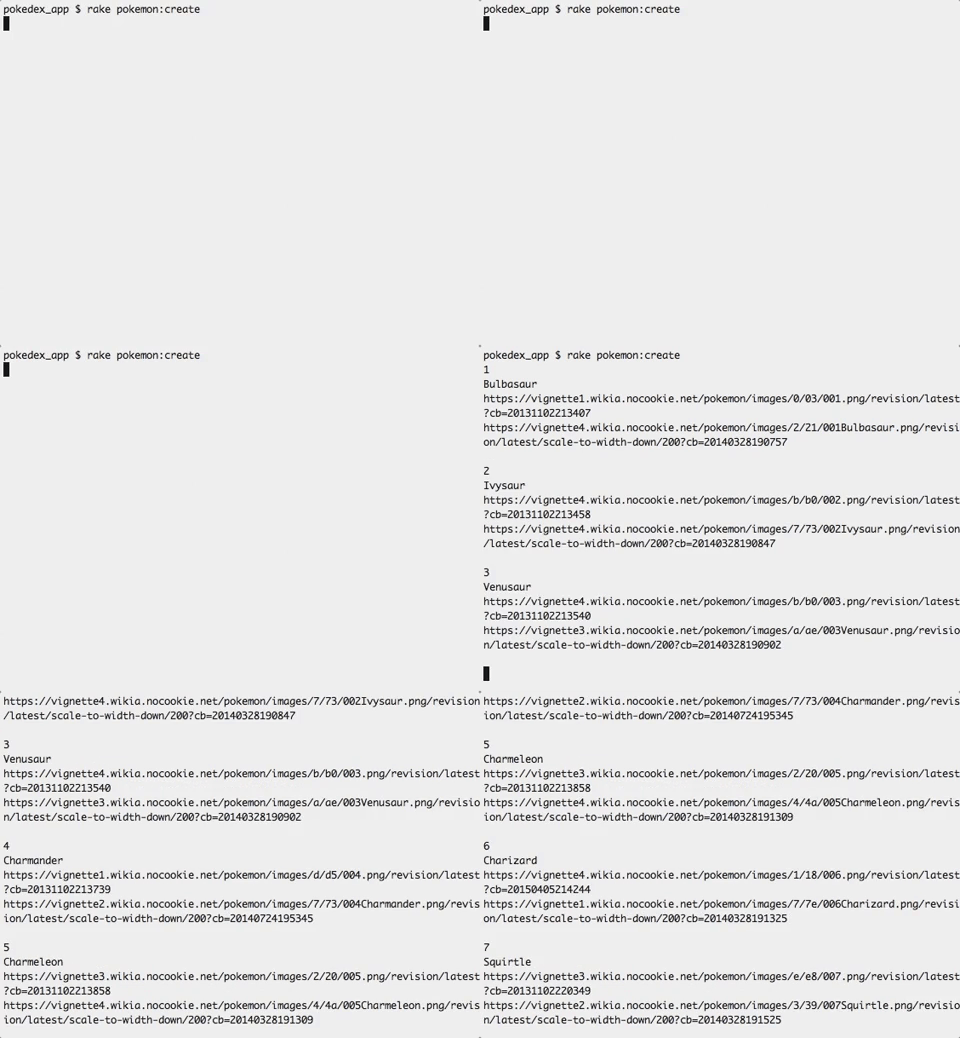
      puts index
      puts name
      puts @icon
      puts @image
      puts ""

      # Once I've validated all my data, I finally generate a model.
      @pokemon = Pokemon.create( id: index, name: name, icon: @icon, image:@image )

    end # end unless
  end # end gen_list
  end # end create
end # end task
Running rake pokemon:create should get you something like this:
And in real time on the site: